
How to Turn a Photo Into a Crochet Pattern (Step-by-Step Guide)
How to Turn a Photo Into a Crochet Pattern (Step-by-Step Guide)
Introduction
Creating a crochet from photo pattern is one of the most creative and meaningful ways to personalize your crochet projects. Instead of following traditional designs, you can transform real photos into crochet artwork — capturing memories, portraits, pets, and special moments in yarn.
Many crocheters are surprised to learn that turning an image into a crochet pattern is much easier today than it was in the past. With modern tools like Stitch Fiddle and other graph generators, you can upload a picture and instantly convert it into a crochet chart.
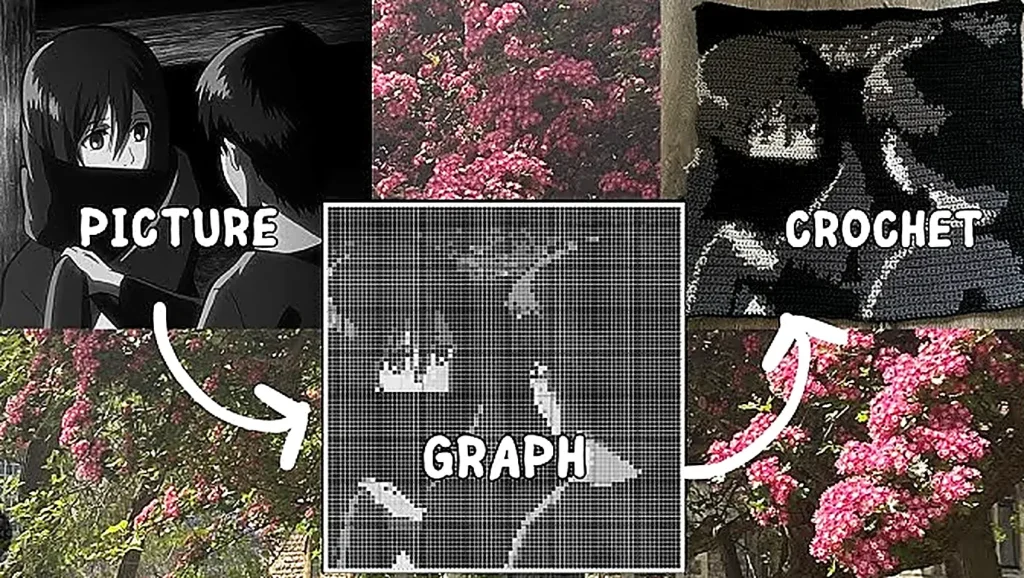
A crochet from photo pattern works by transforming an image into a grid where each square represents a stitch. By following that grid row by row, crocheters can recreate detailed images directly in their fabric.
These types of patterns are especially popular for:
- personalized blankets
- pet portraits
- baby blankets
- memorial pieces
- wall hangings
- custom gifts
In this guide, you’ll learn exactly how to create a crochet from photo pattern, what tools you need, and how to turn any photo into a beautiful crochet project.
The History of Crochet Image Patterns
The idea behind a crochet from photo pattern actually has roots that go back more than a century.
Long before digital tools existed, textile artists used graph paper to convert pictures into stitch charts. This technique was especially common in filet crochet, which became popular in the late 19th and early 20th centuries.
Filet crochet used open and closed mesh squares to create images such as:
- flowers
- monograms
- animals
- decorative motifs
Each square in the chart represented either a filled block or an open space.
As crochet evolved, similar techniques appeared in tapestry crochet and graphghan blankets, where crocheters followed color charts to produce complex images.
Today, technology has transformed the process. Instead of manually drawing graphs, crocheters can use software to automatically generate a crochet from photo pattern in seconds.
This innovation has opened the door to fully personalized crochet artwork.
Tools You Need to Create a Crochet From Photo Pattern
Before starting your project, you’ll need a few essential tools.
Crochet Supplies
Having the right materials will make the process smoother and more enjoyable.
🧶 Yarn (multiple colors)
https://amzn.to/4eACDIa
🪝 Crochet hooks
https://amzn.to/3GdDJx3
✂️ Yarn scissors
https://amzn.to/3IxBmWj
🪡 Tapestry needle
https://amzn.to/4kwF2VR
📍 Stitch markers
https://amzn.to/3TpqtID
These tools help manage color changes and finishing details when working with a crochet from photo pattern.
Pattern Generator Tool
You will also need a crochet graph generator.
The most popular tool used by crocheters is:
Stitch Fiddle
This tool converts photos into crochet charts that you can follow row by row.
How a Crochet From Photo Pattern Works
A crochet from photo pattern is essentially a visual grid.
Each square in the grid represents:
• one crochet stitch
or
• one C2C block
When you follow the chart, you recreate the image stitch by stitch.
The larger the grid, the more detail the final crochet image will have.
For example:
| Grid Size | Detail Level |
|---|---|
| 50 × 50 | Simple image |
| 100 × 100 | Medium detail |
| 200 × 200 | High detail |
This is why large blankets are often used for detailed crochet picture patterns.
Step-by-Step: Turn a Photo Into a Crochet Pattern
Let’s walk through the full process of creating a crochet from photo pattern using Stitch Fiddle.
Step 1 – Choose the Right Photo
Some photos convert better into crochet charts than others.
The best images usually have:
- strong contrast
- simple shapes
- minimal background noise
- clear subjects
Portraits and pet photos often work very well.
If the image is too complex, the crochet from photo pattern may become difficult to read.
Step 2 – Upload the Image to Stitch Fiddle
Go to the Stitch Fiddle website and create a new chart.
Choose:
Crochet → Graph Pattern
Then upload your photo.
The software will automatically convert the picture into a crochet from photo pattern grid.
Step 3 – Adjust the Grid Size
The grid size determines the level of detail in your crochet image.
For example:
Wall hanging → 60 × 60 stitches
Pillow → 80 × 80 stitches
Blanket → 150 × 150 stitches
A larger grid produces a clearer crochet from photo pattern.
Step 4 – Reduce the Colors
Photos often contain hundreds of color variations.
However, crochet patterns work best with fewer yarn colors.
Most crocheters reduce the palette to:
8–15 colors
This keeps the pattern manageable while preserving the main features of the image.
Step 5 – Export the Crochet Graph
Once the adjustments are complete, Stitch Fiddle generates:
- a color chart
- stitch instructions
- a visual grid pattern
You can now download or print your crochet from photo pattern.
Step 6 – Start Crocheting
Now simply follow the grid.
Each square equals one stitch.
Work through the rows until the image slowly appears in your crochet fabric.
Watching the image emerge is one of the most satisfying parts of making a crochet from photo pattern.
Video Tutorial
If you prefer a visual explanation, the tutorial below shows how to create a crochet from photo pattern step by step.
Pro Tips for Creating a Better Crochet From Photo Pattern
Designing a beautiful crochet from photo pattern takes a bit of planning. These expert tips can dramatically improve your results and make the project easier to complete.
Choose High-Contrast Images
One of the biggest factors that affects the quality of a crochet from photo pattern is contrast. Images with clear light and dark areas convert much better into crochet grids.
Photos with strong contrast help the pattern generator identify shapes and edges more accurately.
If needed, use a simple photo editor to:
- increase contrast
- brighten the subject
- darken the background
This simple adjustment can dramatically improve the final crochet chart.
Simplify the Image Before Converting
Busy images with many details often create confusing crochet charts. Before uploading your photo to a graph generator, try simplifying it.
You can do this by:
- cropping the photo
- removing background elements
- focusing on the main subject
A clean subject creates a much clearer crochet from photo pattern.
Limit Your Yarn Colors
Even though photos contain hundreds of colors, crochet patterns are easier to manage with a limited palette.
Most successful crochet from photo pattern projects use between:
8 and 12 yarn colors
Reducing the number of colors makes the project more manageable and prevents excessive yarn switching.
Test With a Small Sample First
Before committing to a large blanket, crochet a test swatch of your pattern.
This allows you to check:
- color transitions
- stitch clarity
- overall image visibility
Testing a small section helps ensure your crochet from photo pattern will look correct when scaled to a larger project.
Use a Digital Chart Tracker
Large crochet charts can be difficult to follow.
Many crocheters prefer using:
- tablets
- printed charts with highlighters
- digital chart apps
Tracking your rows digitally makes it easier to stay on the correct line when working on a detailed crochet from photo pattern.
Size Ideas for Crochet From Photo Pattern Projects
The size of your project will determine how much detail your crochet from photo pattern can show. Larger grids allow more precise image reproduction.
Here are some popular project sizes.
Small Wall Hanging
Small crochet image projects are perfect for decorative wall art.
Typical grid size:
50 × 50 to 70 × 70 stitches
These projects are ideal for simple silhouettes or graphic designs.
Pillow Covers
Photo crochet pillows are a fantastic way to display personalized artwork in your home.
Recommended grid size:
70 × 70 to 90 × 90 stitches
This size works well for portraits, pets, and minimalist images.
Baby Blankets
Personalized baby blankets featuring names or simple images are extremely popular.
Typical size:
90 × 90 to 120 × 120 stitches
A baby blanket using a crochet from photo pattern can become a treasured keepsake.
Medium Graphghan Blankets
Medium-sized graphghan blankets allow more image detail.
Recommended grid size:
120 × 120 to 160 × 160 stitches
These blankets are large enough for clear portraits and landscape-style images.
Large Portrait Blankets
For maximum detail, large blankets work best.
Typical size:
180 × 180 to 220 × 220 stitches
This size is commonly used for highly detailed crochet from photo pattern portrait blankets.
Gift Ideas Using a Crochet From Photo Pattern
Few handmade gifts are as personal as a crochet from photo pattern. These projects transform meaningful photos into handmade art that can be treasured for years.
Here are some creative ideas for gifting photo crochet projects.
Wedding and Anniversary Gifts
Crocheting a couple’s wedding photo into a blanket or wall hanging creates an unforgettable anniversary gift.
Many crocheters create crochet from photo pattern blankets featuring wedding portraits or engagement photos.
Pet Portrait Blankets
Pet lovers adore crochet projects featuring their animals.
A crochet from photo pattern of a beloved dog or cat can be turned into:
- a throw blanket
- a decorative pillow
- wall art
These projects are especially meaningful as memorial pieces.
Baby Memory Blankets
A baby photo converted into a crochet chart creates a beautiful keepsake.
You can also combine the image with:
- the baby’s name
- birth date
- small decorative motifs
A crochet from photo pattern baby blanket often becomes a cherished family heirloom.
Family Photo Crochet
Large family photos can be converted into unique crochet wall art.
These projects are wonderful for:
- living rooms
- craft rooms
- personalized home décor
Memorial Projects
Some crocheters create memorial blankets using photos of loved ones.
A crochet from photo pattern can serve as a meaningful tribute piece that preserves memories in a handmade form.
What the Crochet Community Says
The popularity of crochet from photo pattern projects has exploded in recent years, especially on platforms like Pinterest, Instagram, and crochet Facebook groups.
Many crocheters enjoy these projects because they combine creativity with storytelling. Instead of following a traditional pattern, makers can recreate meaningful moments in yarn.
In online crochet communities, you’ll often see stunning examples of:
- pet portrait blankets
- baby photo graphghans
- wedding crochet art
- memorial tribute blankets
Some advanced crocheters even create incredibly detailed portrait pieces that look almost like pixel art.
Tools like Stitch Fiddle have made it easier than ever for beginners to try creating their own crochet from photo pattern, which has helped drive the growing popularity of these projects.
Many crocheters say that watching the image slowly appear row by row is one of the most satisfying experiences in the craft.
Care Instructions for Crochet Photo Projects
Because a crochet from photo pattern contains detailed color work, proper care is important to preserve the image quality.
Follow these care tips to keep your project looking beautiful.
Wash Gently
Hand washing is often the safest method for detailed crochet projects.
Use:
- cold or lukewarm water
- mild detergent
- gentle squeezing instead of wringing
This protects the yarn fibers and keeps the stitches aligned.
Avoid High Heat
High heat can cause yarn to shrink or distort the stitch structure.
When caring for a crochet from photo pattern, it is best to:
- air dry
- lay flat on a clean towel
- reshape the fabric if needed
Store Properly
Large crochet blankets should be stored folded in a clean, dry place.
Avoid hanging them for long periods, as gravity can stretch the stitches and slightly distort the image.
Protect From Fading
Sunlight can cause yarn colors to fade over time.
If your crochet from photo pattern is displayed as wall art, avoid placing it in direct sunlight for long periods.
Troubleshooting Common Problems
Even experienced crocheters sometimes encounter challenges when working on a crochet from photo pattern. Fortunately, most problems have simple solutions.
The Image Looks Blurry
If the finished crochet image looks unclear, the grid resolution may be too small.
Increasing the stitch count allows the pattern to capture more detail.
For example:
60 × 60 → basic image
150 × 150 → much sharper detail
Too Many Yarn Colors
If you find yourself constantly switching yarn colors, the pattern likely contains too many shades.
When generating a crochet from photo pattern, try reducing the color palette to about 10–12 colors.
This simplifies the project while preserving the main shapes of the image.
The Pattern Is Hard to Follow
Large crochet charts can feel overwhelming.
To make the pattern easier to follow:
- highlight completed rows
- use sticky notes to track your position
- follow the chart digitally on a tablet
These methods help prevent mistakes when working through a complex crochet from photo pattern.
The Image Looks Distorted
If the image appears stretched or uneven, the cause is usually inconsistent stitch tension.
To fix this:
- maintain even tension
- check your stitch size regularly
- block the finished project if needed
Blocking can help straighten stitches and improve the clarity of the crochet from photo pattern.
FAQs
What is a crochet from photo pattern?
A crochet from photo pattern is a crochet chart generated from a photograph, allowing crocheters to recreate images using stitches.
What stitch works best for photo crochet?
Single crochet and C2C are the most commonly used techniques.
Can beginners make a crochet from photo pattern?
Yes. With tools like Stitch Fiddle, beginners can easily convert photos into crochet charts.
How big should a crochet from photo pattern be?
Larger grids produce more detail. Blankets typically use grids of 120–200 stitches.
What yarn works best?
Cotton and acrylic yarns both work well for image crochet projects.
See Also
You may also enjoy these crochet guides on Patterns Here:
🧶 Filet Crochet Pattern Guide (Beginner to Advanced) – Charts, Fish Design & Step-by-Step Tutorial
Modern Crochet Vest Patterns – 10 Stylish Free & Paid Designs for 2026
❤️Crochet Heart Granny Square Pattern (Easy & Beginner-Friendly)
🧶 Easy Granny Square Pattern: A Beginner-Friendly Crochet Guide to Master Your First Square
Studio Ghibli Inspired Anime Crochet Blanket Pattern
Follow Patterns Here for More Inspiration
If you enjoy creative crochet projects and tutorials, follow Patterns Here for more inspiration.
📌 Pinterest
https://www.pinterest.com/patternshere/
📘 Facebook
https://www.facebook.com/thebestcrochet
We share new crochet patterns, ideas, and tutorials regularly to inspire your next project.